EP. 12 - Data design
While designing functions is a necessary skill, we also need to design data. The design of our data will affect on how our functions are implemented.
Here is an example problem, We need to make a data definition to represent the name of a city.
The first thing we do is that we need to form the information that we are trying to represent.
Let's have the sample data first, for examples, we are going to list Manila and Quezon as part of the information. These are all Informations.
Making data definitions has 5 basic steps
- A possible structure definition (not until compound data)
- A type comment that defines a new type name and describes how to form data of that type.
- An interpretation that describes the correspondence between information and data.
- One or more examples of the data.
- A template for a 1 argument function operating on data of this type.
We need to decide on what kind of data definition to use, based on the form of information we are trying to represent.
There are 7 Data definitions that we can choose.
- Simple atomic data
- Interval
- Enumeration
- Itemization
- Compound data
- References to other defined type
- Self referential or Mutually referential
Since city names are already considered atomic data, which means no information cannot be derived anymore from them and are considered basic data. We can use Simple Atomic Data as our data definition.
Data definitions have their own template. Regarding the names of cities, we can declare a variable for the data and decide what datatype should the information represent to. For this case, since city names compose of sequences of characters, we can use strings to represent cities.
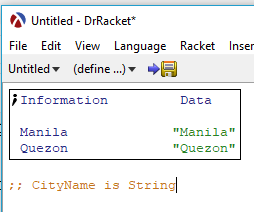
We also need to interpret the data to know what kind of information is it. We need to specify what is the meaning of the Data that we would use

Examples of the data are also needed, in this case, 2 examples are enough for Simple Atomic Data.
The next step is to produce the template. A data driven template is a function that will serve as a guide on how to approach that data.
A data driven template generally looks like this
(define (fn-for-type-name x)
<body>)
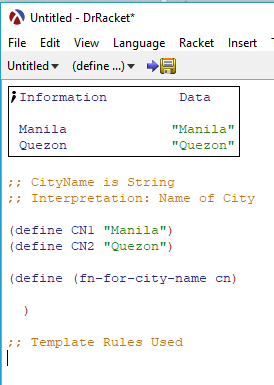
We now need to pick a template rule. A rule of thumb is to look at the datatype representing that information. Since the datatype specified here is string. We can use the template for the string.

We have completed the data definition, now we just need to create the function. This is how we use HtDF in conjunction with HtDD.
For this example, We need to have a function that determines if the entered city is the best city in the world. That function will consume the data that we have declared.
We can follow the steps of HtDF
First, the signature

Since we are asking if the entered city is the best city. We would use a boolean datatype.
The purpose would be to produce a true value if the given city is the best city in the world, remember about being specific when dealing with booleans.
Let's make the function stub

Now we can make the test cases. Since we are working with booleans, we need to have 2 cases in which covers both results.

Now to run the tests to make sure my stub is correct.
Even if the results failed, the two test ran and that is what matters at this point.
We can take the template from our CityName Definition since our function takes it as an input anyway. Note that we need to specify which template we took it from.

We should have an Idea on what code should this function contain. We need to compare strings since it is asking when the given string is the best city.

Now we have a working function that satisfies the problem domain
Mga Komento
Mag-post ng isang Komento